



Content
Overview
A Checker has a set of Filters that decide which audit events
the Checker reports through its listeners. Interface Filter
and class FilterSet are intended to support general AuditEvent
filtering using a set of Filters.
A Filter has boolean method accept(AuditEvent) that
returns true if the Filter accepts the AuditEvent
parameter and returns false if the Filter rejects it.
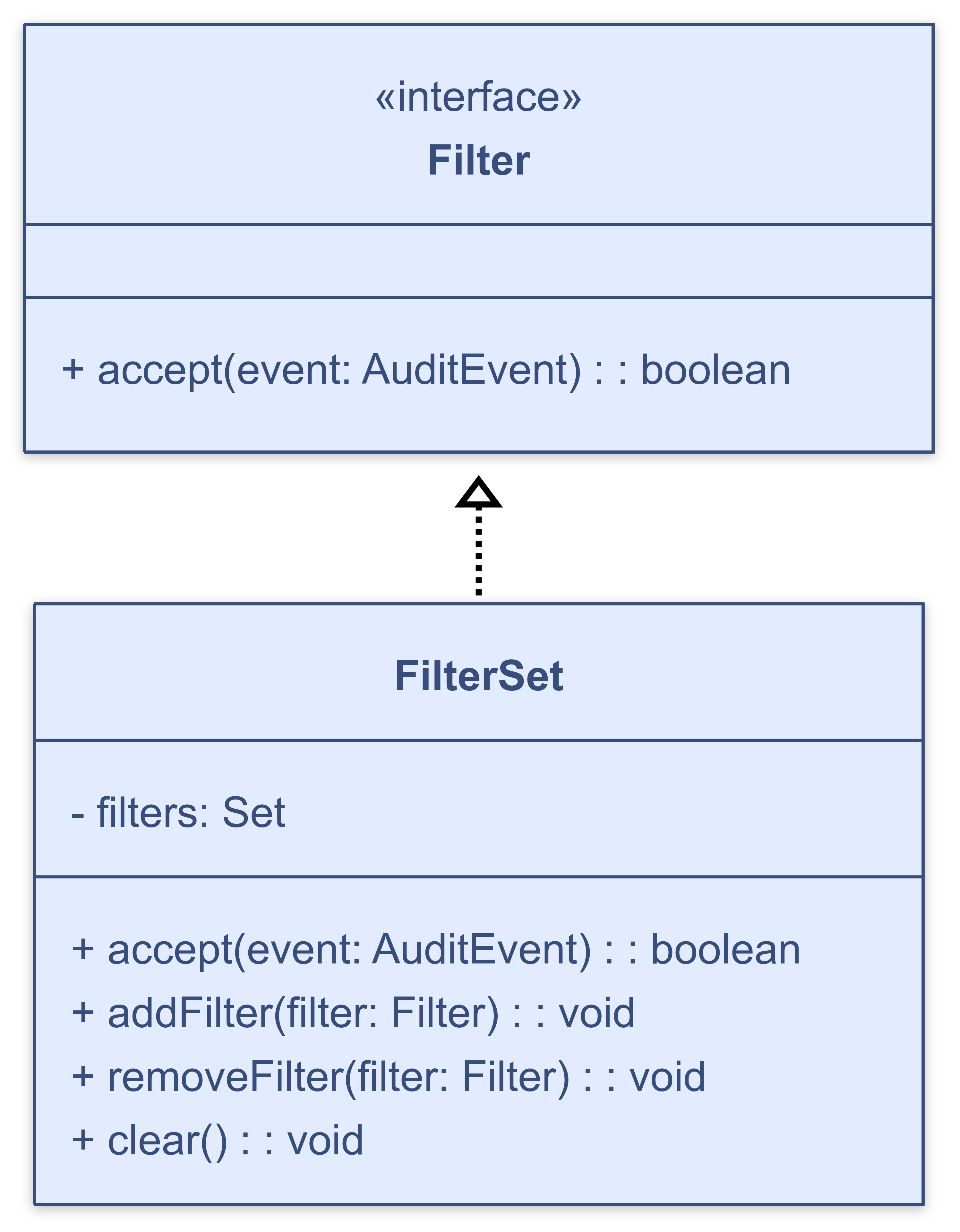
A FilterSet is a particular Filter that contains a set of
Filters. A FilterSet accepts an AuditEvent if and
only if all Filters in the set accept the AuditEvent.
Here is a UML diagram for interface Filter
and class FilterSet.
Checkstyle also provides the TreeWalkerFilter interface for filters
that must live inside the TreeWalker module. See
Writing TreeWalkerFilters below.
Writing Filters
The Filter that we demonstrate here rejects
audit events for files whose name matches a Pattern. In order to
enable the specification of the file name pattern as a property in a
configuration file, the Filter is an AutomaticBean
with mutator method setFiles(String) that
receives the file name pattern. An AutomaticBean uses JavaBean
introspection to set JavaBean properties such as files.
package com.mycompany.filters;

import java.util.regex.Matcher;
import java.util.regex.Pattern;
import java.util.regex.PatternSyntaxException;

import com.puppycrawl.tools.checkstyle.api.AuditEvent;
import com.puppycrawl.tools.checkstyle.api.AutomaticBean;
import com.puppycrawl.tools.checkstyle.api.Filter;
import com.puppycrawl.tools.checkstyle.api.Utils;

public class FilesFilter
    extends AutomaticBean
    implements Filter
{
  private Pattern mFileRegexp;

  public FilesFilter()
      throws PatternSyntaxException
  {
    setFiles("^$");
  }

  public boolean accept(AuditEvent aEvent)
  {
    final String fileName = aEvent.getFileName();
    return ((fileName == null) || !mFileRegexp.matcher(fileName).find());
  }

  public void setFiles(String aFilesPattern)
      throws PatternSyntaxException
  {
    mFileRegexp = Utils.getPattern(aFilesPattern);
  }
}
Writing TreeWalkerFilters
A TreeWalkerFilter is like a Filter but must be declared
as a child of the TreeWalker module instead of Checker.
It receives a TreeWalkerAuditEvent instead of a plain
AuditEvent, which additionally provides access to the file's
FileContents (including comments) and the root DetailAST
of the parsed syntax tree.
The TreeWalkerFilter that we demonstrate here suppresses violations
on any line that contains a single-line comment matching a configurable pattern.
Like the built-in SuppressionCommentFilter, it extends
AbstractAutomaticBean so its property can be set from the
configuration file.
package com.mycompany.filters;

import java.util.regex.Pattern;

import com.puppycrawl.tools.checkstyle.AbstractAutomaticBean;
import com.puppycrawl.tools.checkstyle.TreeWalkerAuditEvent;
import com.puppycrawl.tools.checkstyle.TreeWalkerFilter;
import com.puppycrawl.tools.checkstyle.api.FileContents;
import com.puppycrawl.tools.checkstyle.api.TextBlock;

public class CommentAnnotationFilter
    extends AbstractAutomaticBean
    implements TreeWalkerFilter
{
    private Pattern commentPattern = Pattern.compile("@SuppressMyCheck");

    public void setCommentPattern(String pattern)
    {
        commentPattern = Pattern.compile(pattern);
    }

    @Override
    protected void finishLocalSetup() {}

    @Override
    public boolean accept(TreeWalkerAuditEvent event)
    {
        if (event.violation() == null) {
            return true;
        }
        final FileContents contents = event.fileContents();
        final TextBlock comment =
            contents.getSingleLineComments().get(event.getLine());
        return comment == null
            || !commentPattern.matcher(comment.getText()[0]).find();
    }
}
Using TreeWalkerFilters
To incorporate a TreeWalkerFilter, declare it as a child of the
TreeWalker module in the configuration file. For example:
<module name="Checker">
  <module name="TreeWalker">
    <module name="com.mycompany.filters.CommentAnnotationFilter">
      <property name="commentPattern" value="@SuppressMyCheck"/>
    </module>
    <module name="ConstantName"/>
  </module>
</module>
Note that a TreeWalkerFilter only applies to checks that are also
children of the TreeWalker module. To filter non-TreeWalker checks,
use a regular Filter under Checker instead.
Declare check's external resource locations
Using Filters
To incorporate a Filter in the filter set
for a Checker, include a module element for
the Filter in the configuration file. For example, to
configure a Checker so that it uses custom
filter FilesFilter to prevent reporting of
audit events for files whose name contains "Generated",
include the following module in the configuration file:
<module name="com.mycompany.filters.FilesFilter">
  <property name="files" value="Generated"/>
</module>
Huh? I can't figure it out!
That's probably our fault, and it means that we have to provide better documentation. Please do not hesitate to ask questions on the user mailing list, this will help us to improve this document. Please ask your questions as precisely as possible. We will not be able to answer questions like "I want to write a filter but I don't know how, can you help me?". Tell us what you are trying to do (the purpose of the filter), what you have understood so far, and what exactly you are getting stuck on.
Contributing
We need your help to keep improving Checkstyle. Whenever you write a filter that you think is generally useful, please consider contributing it to the Checkstyle community and submit it for inclusion in the next release of Checkstyle.